

TL;DR You don’t need to buy WoW: Forever. You only need playtime, and the simplest way to get it without a credit card is 60 Days of Game Time for US$29.99, paid with Razer Gold that you load through GCash, Maya, or cash at 7-Eleven. Monthly subscriptions start at US$14.99 but only accept cards and PayPal. The Skyborne packs are optional extras. New player? There are no realms to pick. Choose the Normal ruleset in the Americas & Oceania region, make sure your friends pick the same ruleset and faction, and start with a Hunter.
WoW: Forever just had the biggest launch in World of Warcraft history, according to Blizzard, with the most returning players ever. Pero aminin natin: the Battle.net Shop can be confusing. There are subscriptions, Game Time, three different packs, and payment options that change depending on what you click. We went through the shop ourselves from the Philippines so you don’t have to guess. Here’s exactly what to buy, how to pay, and what you get.
First, the most important thing: you don’t buy the game
If you played WoW years ago, you probably remember buying the box first, then paying monthly. Forget that. WoW: Forever has no box price. All you need is active playtime on your account, through either Game Time or a subscription. Either one unlocks all of Forever’s base content: the new zones, 1,000+ new quests, dungeons, and the raids coming on December 9.
Bonus: the same playtime also covers modern World of Warcraft (up to level 80), WoW Classic, and Mists of Pandaria Classic. The only thing not included is modern WoW’s newest expansion, Midnight, which is sold separately. You don’t need it for Forever.

Quick answer: what should you buy?
| If you are… | Buy this | Pay with |
|---|---|---|
| New and just want to try it, no credit card | 60 Days of Game Time (US$29.99) | Razer Gold via GCash, Maya, or 7-Eleven |
| New and want to try it, with a card or PayPal | 1-month subscription (US$14.99) | Credit/debit card or PayPal |
| Sure you’ll play for months, with a card or PayPal | 6-month or 12-month subscription (US$12.99/month) | Credit/debit card or PayPal |
| Really want the new Skyborne race | Skyborne Heroic Pack (US$29.99) plus Game Time or a subscription | See below |
If you’re still unsure, go with the first row. It’s the cheapest way to start, needs no card, and won’t charge you again automatically.
Your three options, explained
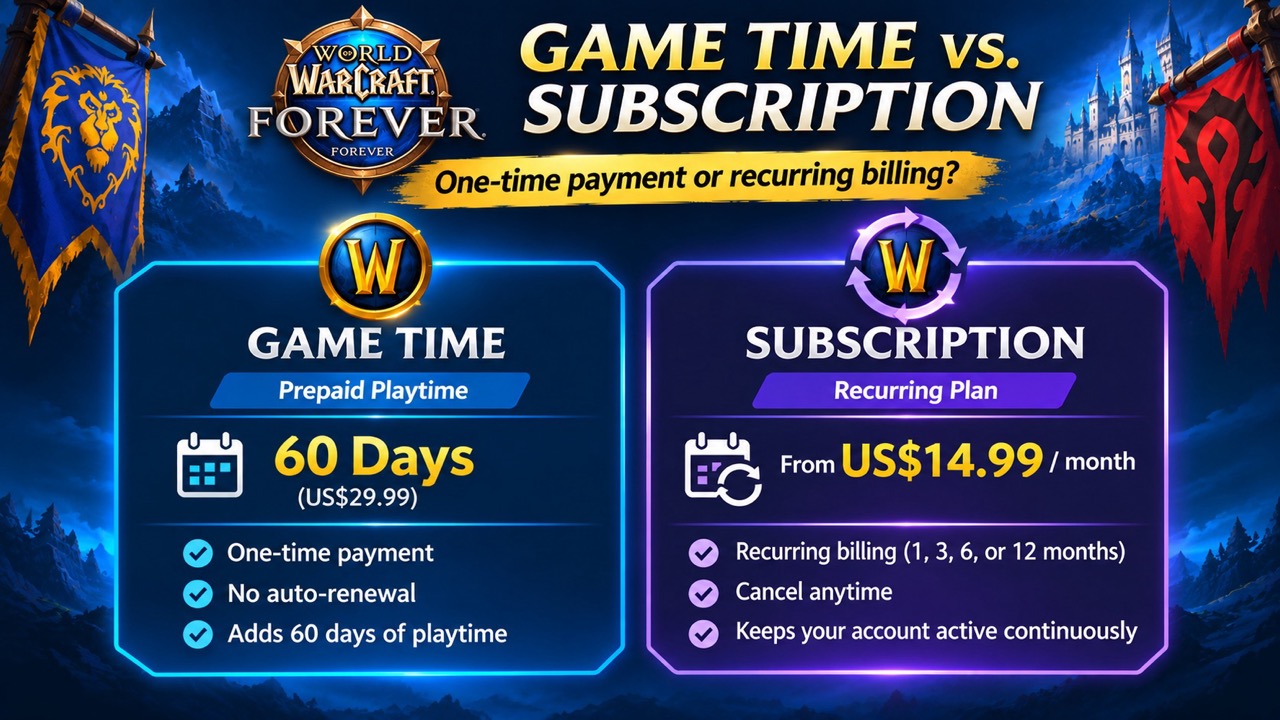
Option 1: 60 Days of Game Time (best for beginners and no-card players)
- Price: US$29.99 for 60 days, which is the same as US$14.99 a month
- Auto-renew: No. You pay once, play 60 days, and decide later if you want more.
- Payment options we saw at checkout: PayPal, credit or debit card, Apple Pay, Battle.net Balance, Google Pay, and Razer Gold
- Link: 60 Days of Game Time on the Battle.net Shop
Note: Game Time is a separate product from the subscription page. If you’re browsing the shop, search for “Game Time” by name, or just use the link above.
Option 2: Monthly subscription (best if you have a card and plan to stay)
| Plan | Price | Savings |
|---|---|---|
| 1 month | US$14.99/month | None |
| 3 months | US$13.99/month | Save US$12 a year |
| 6 months (special offer) | US$12.99/month | Save US$24 a year |
| 12 months (special offer) | US$12.99/month | Save US$24 a year |
- Auto-renew: Yes. It keeps charging you until you cancel in your Battle.net account settings.
- Payment options: PayPal or credit/debit card only. Razer Gold, Battle.net Balance, Apple Pay, and Google Pay do not appear here.
- Longer plans are cheaper per month, but you pay for the whole period upfront.
- Link: World of Warcraft Subscription on the Battle.net Shop
Option 3: Skyborne packs (optional extras, not a way in by themselves)
| Pack | Price | What you get |
|---|---|---|
| Skyborne Heroic Pack | US$29.99 | The Skyborne race, its Zephras Isle starting zone, a mount, and extras |
| Skyborne Epic Pack | US$59.99 | Everything in Heroic, plus 30 days of Game Time and more cosmetics |
| Warcraft Forever Collection | US$79.99 (limited time) | Everything in Epic, plus Warcraft III: Reforged and the Forsaken Kingdom campaign |
- Among playable races and starting experiences, only the Skyborne race and Zephras Isle starting experience require an upgrade pack. The packs also include optional mounts, cosmetics, and other bonuses.
- Packs do not replace playtime. Even with the Heroic Pack, you still need Game Time or a subscription to log in.
- Link: WoW: Forever packs on the Battle.net Shop
Tipid tip if you want the Skyborne: the Heroic Pack (US$29.99) plus 60 Days of Game Time (US$29.99) costs US$59.98, practically the same as the Epic Pack (US$59.99). But Heroic plus Game Time gives you 60 days of play, while the Epic Pack only includes 30 days. Get the Epic Pack only if you really want its extra cosmetics.
Bring a friend to Azeroth for free (launch week only)
There’s another launch-week bonus worth knowing about. Skyborne packs bought through Blizzard’s launch offer came with Invite-A-Friend Launch Codes that let an eligible friend play WoW: Forever without buying Game Time or a subscription. The Heroic Pack comes with one code, while the Epic Pack and Warcraft Forever Collection include three in total. Blizzard sends the codes by email, so if you or someone in your barkada bought an eligible pack, check your inbox. You might already have a free invite waiting for a friend. Your friend just redeems the code on their own Battle.net account. Take note: the free access only runs until November 11 (PST), which is around the afternoon of Thursday, November 12, here in the Philippines. After that, your friend will need Game Time or a subscription to keep playing. The code also doesn’t unlock the Skyborne race. Kaya kung may kaibigan kang curious pa, now’s the time. Share this guide with them!

Step by step: how to start without a credit card
This is the easiest path for most Pinoy players. Follow it exactly and you’ll be in Azeroth tonight.
- Create a free Battle.net account at account.battle.net. Use an email you check often and turn on two-step verification for security.
- Download and install the Battle.net app on your PC from download.battle.net, then log in.
- Create a free Razer ID and open your Razer Gold wallet at gold.razer.com. Make sure your wallet is set to the Philippines.
- Load your Razer Gold wallet using GCash, Maya, or cash at 7-Eleven. Load around ₱1,800 to cover US$29.99 plus a small buffer for the exchange rate. Kung naglo-load ka na ng Razer Gold for MLBB diamonds, same process lang. Note: over-the-counter loads can take a while to arrive, so load ahead of time.
- Open 60 Days of Game Time while logged in to Battle.net and click Buy Now.
- Choose your game account. Before the payment page, Battle.net asks you to pick a WoW game account under “Your game accounts.” Brand-new players will usually see just one, or a button to create one. If you have more than one (like “WoW1” and “WoW2”), pick the one you’ll actually play on, because your Game Time only goes to the account you select. The “(US)” label is normal: it’s Blizzard’s Americas & Oceania region, which is where Pinoy players play WoW: Forever. Then click Continue.
- Choose Razer Gold from the “Pay With” menu, double-check the amount (US$29.99), and confirm your payment.
- Install WoW: Forever from the Battle.net app. Open World of Warcraft, choose the WoW: Forever version from the game dropdown, and click Install. If you have more than one game account, make sure the same account you paid for is selected in the app.
- Log in, choose your ruleset, make your character, and play. There’s no realm list to worry about. See our new player tips below.
When your 60 days are almost up, the Battle.net app shows the time remaining. Just load Razer Gold again and buy another 60 days. Walang surprise charges.
Step by step: if you have a credit card, debit card, or PayPal
- Do steps 1 and 2 above: create your Battle.net account and install the app.
- Open the WoW Subscription page, pick a plan, and click Subscribe. If you’re new, start with 1 month.
- Choose your game account on the “Your game accounts” screen. Pick the account you’ll play on (most new players only have one), then click Continue. The subscription only applies to the account you select.
- Choose PayPal or Credit or Debit Card. Philippine Visa and Mastercard debit cards may work, provided international online and recurring payments are enabled. Approval still depends on your bank and card issuer.
- Install WoW: Forever and play.
- Set a reminder to cancel before the next billing date if you decide WoW isn’t for you, since subscriptions renew automatically.
Common mistakes to avoid
- “I can’t find Razer Gold at checkout.” You’re probably on the Subscription page. Razer Gold only works for one-time purchases like 60 Days of Game Time.
- “I paid, but the game still says I have no Game Time.” You may have picked the wrong game account at checkout. If your Battle.net has more than one WoW account (like “WoW1” and “WoW2”), check which one received the Game Time, and select that same account in the Battle.net app before you play.
- “I can’t group with my friend.” You’re probably on different rulesets or different factions. To party up, join the same guild, or send each other mail, you both need the same ruleset and the same faction (Alliance or Horde).
- “I bought the Heroic Pack but I can’t log in.” Packs don’t include playtime (except the Epic Pack’s 30 days). You still need Game Time or a subscription.
- “I thought I had to buy the game first.” No box needed. Playtime is all you need.
- “My Battle.net Balance card won’t work.” A Balance gift card only works if its currency matches the currency in your Battle.net Shop. Balance also can’t pay for a subscription, only one-time purchases like Game Time. Redeem gift card and Game Time codes on Blizzard’s Redeem a Code page.
- “There’s no peso price.” Normal. Philippine accounts are billed in US dollars, and your wallet or card converts it.
- “I bought cheap codes on Facebook and they didn’t work.” Only buy from official channels or trusted sellers. Too-cheap codes are often fake or already used.

New to WoW? How to start right
Paid na? Good. Here are a few choices that will make your first days much easier.
1. Choose the Americas & Oceania region. WoW: Forever is realmless, so there’s no long list of servers to pick from. Instead, players choose a ruleset that determines their gameplay environment and community. Think of it as choosing the kind of Azeroth you want to live in rather than choosing a traditional server. For Pinoy players, that’s Americas & Oceania, the same “(US)” region you saw at checkout. WoW’s Oceanic infrastructure is hosted in Australia, which generally offers better latency for Filipino players than connecting to North American infrastructure. Actual ping will still depend on your ISP and connection routing.

2. Choose your ruleset. Instead of a realm, you pick a ruleset when you make a character. Think of it as the house rules of the world you’ll live in:
- Normal (recommended): Best for beginners and most players. Other players can’t attack you unless you choose to fight. You can make both Alliance and Horde characters here.
- PvP: Players from the other faction can attack you in most of the world. Exciting, but frustrating if you’re still learning. Take note: on PvP, you can only make characters of one faction. Once you make an Alliance character there, you can’t make a Horde one, and vice versa.
- Roleplay: For players who want to stay in character. It has strict naming rules and behavior rules, so no “xXSlayerXx” names here.
- Roleplay-PvP: Roleplay rules plus open-world PvP. Blizzard added this one shortly before launch.
- Hardcore (coming after launch): One life only. If your character dies, you lose it on Hardcore for good. Definitely not for your first character!
Important: coordinate with your barkada first. You can only group, join a guild, send mail, and raid with players on the same ruleset and the same faction. There’s no cross-faction grouping, and Blizzard intentionally limits moving between rulesets, so you can’t just hop your character over later. Kaya bago gumawa ng character, mag-usap muna kayo: same ruleset, same faction.
Bonus tip: set your Preferred Online Language. Since there are no language-specific realms anymore, Blizzard added a language setting instead. In-game, press Esc, go to Options, then under System open Languages and Social, and set Preferred Online Language to English. Blizzard says it helps you run into players who share that preference, though players still debate how much it actually does. It applies to your whole account, and you have to wait 24 hours before you can change it again, so set it once and leave it.
3. Pick a beginner-friendly class. WoW: Forever has nine classes: Druid, Hunter, Mage, Paladin, Priest, Rogue, Shaman, Warlock, and Warrior. If it’s your first time, the Hunter is the safest pick. Your pet fights beside you and takes hits, so leveling solo is much easier. Forever’s new Human Hunter combo is a nice option for Alliance players. Warlocks also level well solo. In the end, though, play what looks fun to you. Every class can reach level 60.
4. Know what to expect. WoW: Forever is closer to classic WoW than to modern WoW. Leveling is slower, quests matter, and you’ll walk a lot before you get a mount. That’s part of the charm. Hindi ito mabilisang laro, so take your time, join a guild, and group up with other players. The community is the best part.
5. Mark your calendar for December 9. The first raids unlock that day: Barrow Deeps (10 players), Hyjal Summit (20 players), and Onyxia’s Lair (40 players). The Hardcore ruleset is also coming after launch, though Blizzard hasn’t given a date yet. You don’t need to rush, but if you start now, you’ll have about four weeks to reach level 60 before raid day.
Quick links
- Create or manage your Battle.net account
- Download the Battle.net app
- 60 Days of Game Time (US$29.99)
- WoW Subscription (from US$12.99/month)
- WoW: Forever Skyborne packs (optional)
- Redeem a Code (gift cards and Game Time codes)
- Razer Gold
- Blizzard Support: payment methods for subscriptions
Want to know why WoW still means so much to our team? Read why WoW: Forever hits different for Pinoy MMO veterans and our Editor-in-Chief’s story as an Undead healer in 2007.
Got stuck somewhere in the payment process? Tell us in the comments and we’ll try to help. And if you’re already in Azeroth, share your ruleset, faction, and class, and let’s see how many Pinoy players are out there.
Disclaimer
This article is independently published by Pinoy Gaming Network and is not affiliated with or endorsed by Blizzard Entertainment, Battle.net, Razer, GCash, or Maya.
Prices, promotions, payment methods, and product availability may change without notice. Actual charges in Philippine pesos may vary due to exchange rates, conversion fees, and payment provider charges.
Always verify your account, payment details, and final purchase amount through official platforms before completing a transaction.
Enjoying our coverage? Pinoy Gaming Network is an independent site. If you’d like to support us, you can buy us a coffee here.


