 Pinoy Gaming Network Where Pinoy Gamers Unite!

TL;DR: In an NVIDIA card name like RTX 5070 Ti, the first two digits (50) tell you the generation and the last two (70) tell you the tier. Higher tier means more power and a higher price. And no, the RTX 5090 inside a gaming laptop is not the same card as the RTX 5090 in a desktop.
If you’ve ever scrolled through Shopee or walked the aisles of Gilmore and felt lost between an RTX 5060, a 5060 Ti and a 5070, hindi ka nag-iisa. NVIDIA’s naming looks like a random string of numbers, pero may sistema talaga. Once you know how to read it, you can tell roughly where a card stands before you even look at the price tag. Medyo technical ‘to, pero promise, madali lang.
How to read an NVIDIA GPU name
Take the GeForce RTX 5070 Ti as an example.
- GeForce is NVIDIA’s brand for gaming graphics cards.
- RTX means the card has dedicated hardware for ray tracing and DLSS. Older cards, up to the GTX 16 series, used the GTX label and lack those features.
- 50 is the generation. The RTX 50 series, built on NVIDIA’s Blackwell architecture, launched in 2025. Before it came the 40 series (2022), 30 series (2020) and 20 series (2018).
- 70 is the tier. 90 sits at the very top, 50 is the entry level.
- Ti marks a stronger version of the same tier, with more cores and higher performance. A 5070 Ti beats a plain 5070.
There’s also Super, a mid-cycle refresh label NVIDIA used for the RTX 40 series in 2024. An RTX 50 Super lineup has been rumored and delayed for over a year now, but as of this writing, wala pa ring official announcement.
One tip that saves a lot of regret: tier usually matters more than generation. An older high-tier card like the RTX 4080 still outruns a brand-new RTX 5060. Kaya huwag basta magpadala sa “bago.”
The RTX 50 lineup, strongest to cheapest
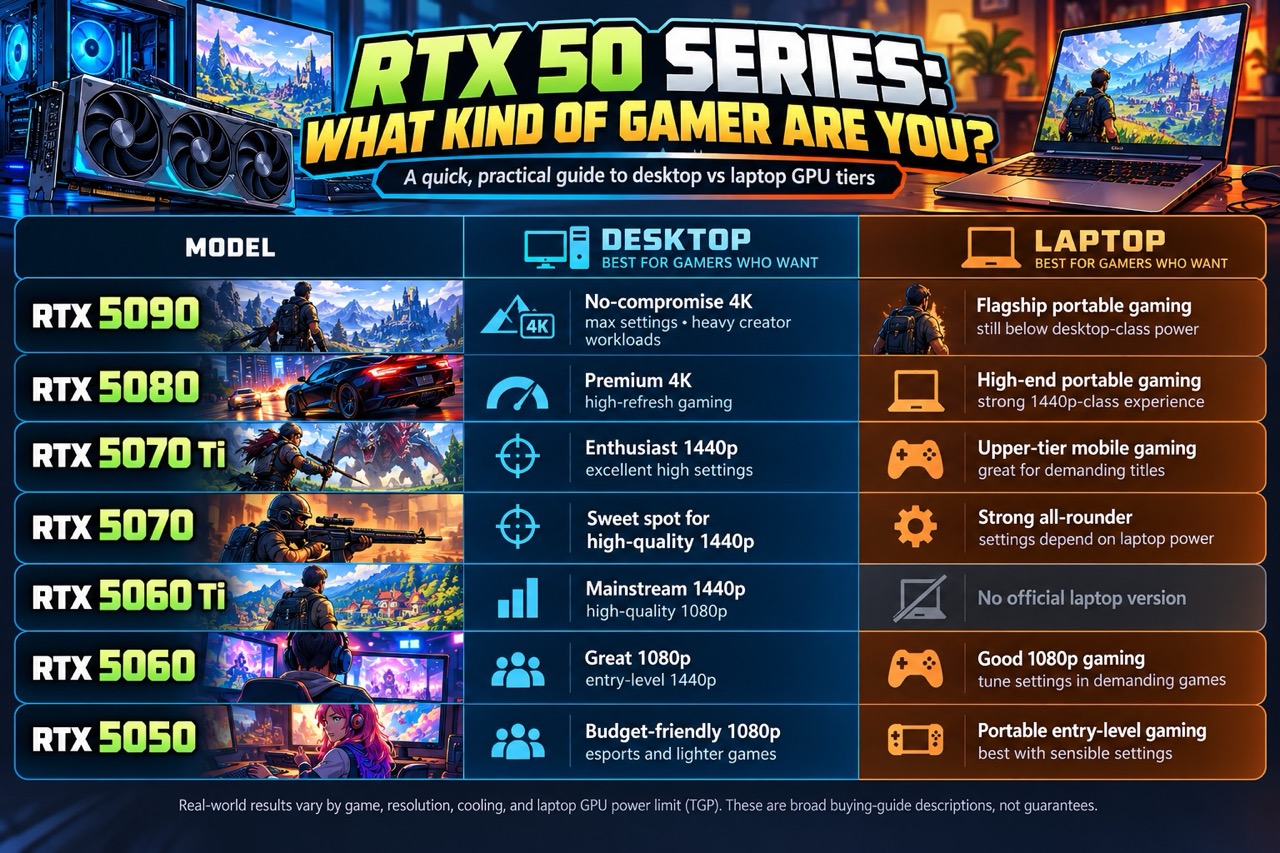
Here’s the current RTX 50 family ranked from most powerful to most affordable, desktop and laptop side by side. CUDA cores are the GPU’s processing units, so within the same generation, more cores generally means more performance.
| Rank | Model | Desktop: CUDA cores / VRAM | Laptop: CUDA cores / VRAM |
|---|---|---|---|
| 1 | RTX 5090 | 21,760 / 32GB | 10,496 / 24GB |
| 2 | RTX 5080 | 10,752 / 16GB | 7,680 / 16GB |
| 3 | RTX 5070 Ti | 8,960 / 16GB | 5,888 / 12GB |
| 4 | RTX 5070 | 6,144 / 12GB | 4,608 / 8GB |
| 5 | RTX 5060 Ti | 4,608 / 8GB or 16GB | No laptop version |
| 6 | RTX 5060 | 3,840 / 8GB | 3,328 / 8GB |
| 7 | RTX 5050 | 2,560 / 8GB | 2,560 / 8GB |
The RTX 5090 is the enthusiast pick for 4K gaming and heavy AI or creative work. The 5080 and 5070 Ti handle high-refresh 1440p and 4K with ease. The 5070 and 5060 Ti sit in the sweet spot for most Pinoy builds, while the 5060 and 5050 are the budget doors into the RTX 50 series, sakto for 1080p and esports titles like Valorant and Dota 2.
Desktop vs laptop: same name, different card
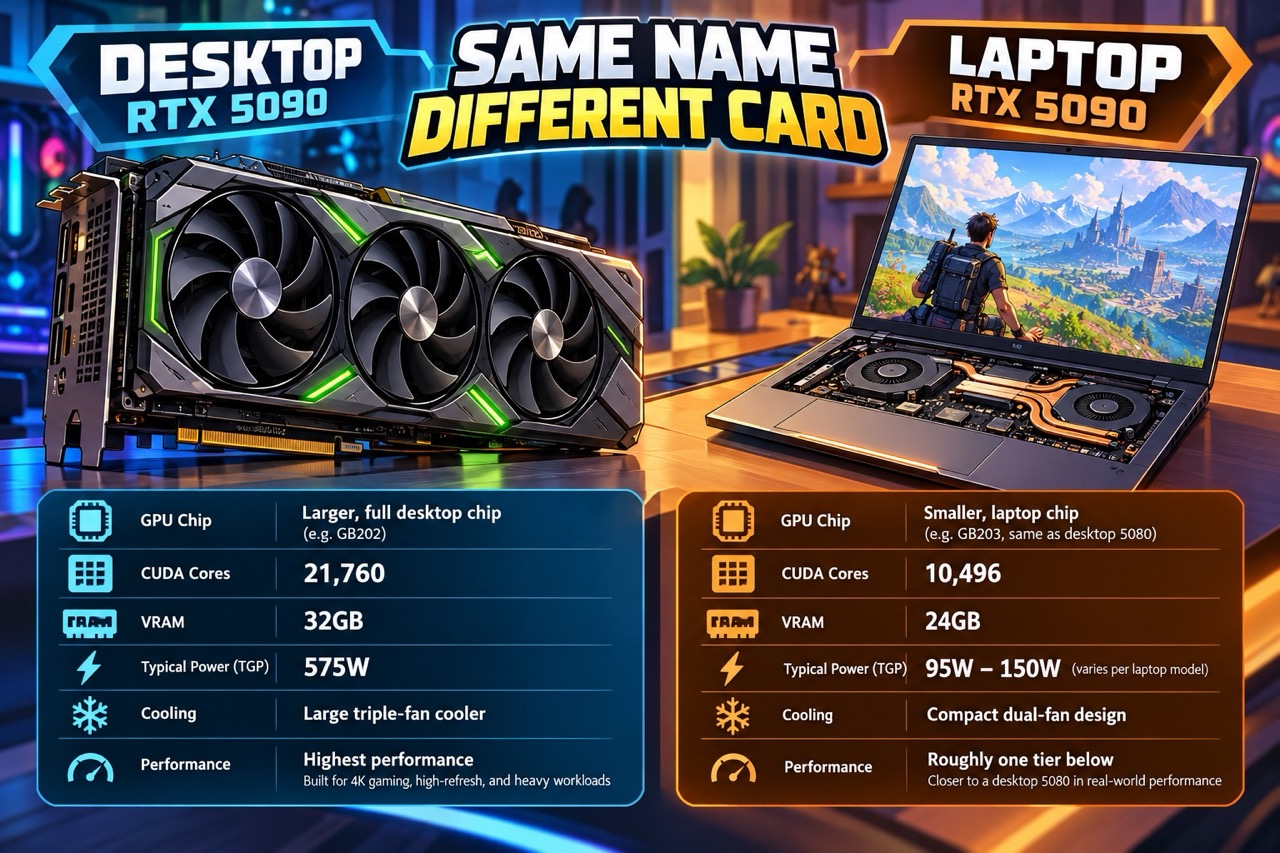
Ito ang madalas na nakakalito. NVIDIA uses the same model names for desktop and laptop GPUs, but the laptop versions are smaller chips running on far less power.
The clearest example is the RTX 5090. The desktop card has 21,760 CUDA cores and is rated at 575 watts. The laptop RTX 5090 uses the GB203 chip, the same one inside the desktop RTX 5080, with 10,496 cores and a power range of 95 to 150 watts. Notebookcheck found the fastest laptop RTX 5090 it tested landed about 5% behind a desktop RTX 5080. In one Dota 2 test, the desktop 5090 pushed 291 fps while a laptop 5090 managed 137 fps.
A simple rule of thumb: a laptop GPU performs roughly like the desktop card one tier below it. Notebookcheck, for example, puts the laptop RTX 5080 close to a desktop RTX 5070.
Then there’s TGP, or total graphics power. Dito madalas naloloko ang buyers. Laptop makers can run the same GPU at different wattages, so two laptops with the “same” RTX 5070 can perform very differently. NVIDIA allows the RTX 5070 Laptop GPU to run anywhere from 50 to 100 watts. Before you buy, check the TGP in the spec sheet. Some PH listings already show it, like ASUS rating the 2026 ROG Zephyrus G16’s RTX 5090 Laptop GPU at up to 160W.
So which is better? Desktops give you more performance per peso and easy upgrades later. Laptops win on portability, perfect if you game in the dorm, sa probinsya, or between classes. Just know exactly what you’re paying for.
Next up: Team Red
That’s NVIDIA. Pero paano naman ang AMD? In our next explainer, we’ll do the same breakdown for Radeon cards, from the top-end RX models down to the budget picks, plus how Radeon laptop GPUs compare to their desktop siblings. Team Red ka ba? Abangan!
Enjoying our explainers? Pinoy Gaming Network is an independent site. If you’d like to support more guides like this, you can buy us a coffee at buymeacoffee.com/pinoygaming.


